

Get paid while you create in ComfyUI.
Opt-in sponsored placements from AI & GPU companies inside ComfyUI. See relevant ads, keep your focus, and earn a share of ad revenue.
- Opt-in only
- Relevant AI tooling sponsors
- Earn while you create
How it works
Simple for creators. Powerful for advertisers.
Install the plugin
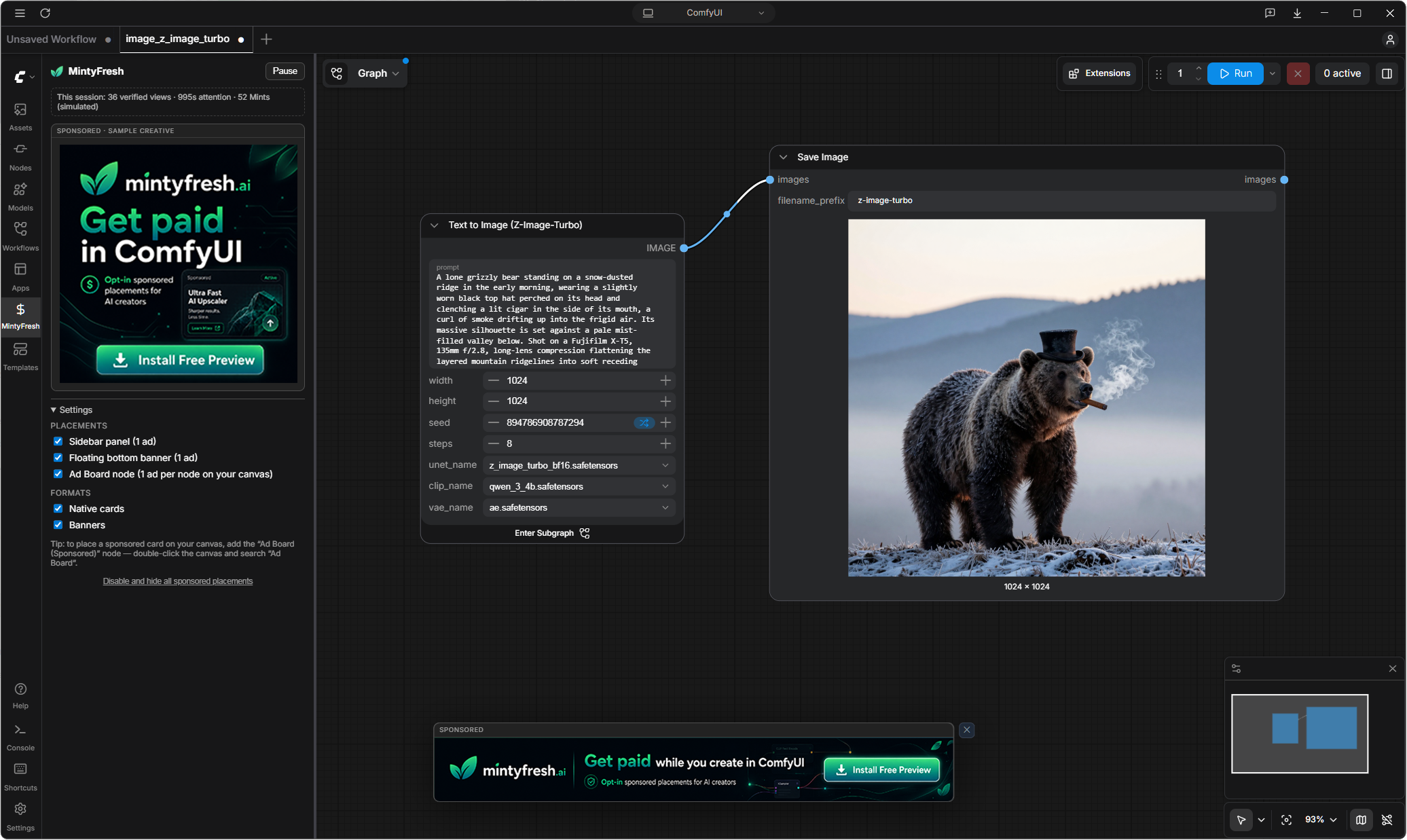
Drop mintyfresh into your ComfyUI custom nodes and opt in from the sidebar panel. Nothing renders until you say so.
See sponsored placements
Clearly labeled sponsored cards and banners appear while you work — never interrupting your flow, never covering your graph.
Earn rewards / launch campaigns
Users earn automatically for verified attention. Advertisers launch campaigns and reach engaged creators.
Earn rewards while you create
Stay in control. See relevant sponsors. Get rewarded.
Reach active AI creators
Place your brand where builders discover and decide.
Supported placements inside ComfyUI
Your brand in the right place. Never in the way.
Create more.
Discover. Download. Create. Explore
We're just getting started.
mintyfresh is in early access. The plugin is available today as a free preview — fully opt-in, with clearly labeled sample creatives and privacy-first, local-only measurement while the ad network comes online.
- Plugin preview available now for ComfyUI on Windows, macOS & Linux
- Advertiser self-serve portal and creator payouts are in development
- Founding advertisers get first access to launch inventory
Bid live for the most-watched sidebar in AI creation.
Each block buys 1,000 verified impressions inside ComfyUI. Highest bid serves first; bid any amount from $0.50 — outbid the top to take #1, or queue up behind it. 50% of every dollar settles to the creator whose screen showed your ad. Free during early access: no payment details, every creative human-reviewed before serving, and you confirm billing before your campaign ever spends anything.
| # | Brand | Campaign | Sidebar CPM | Banner CPM | Status |
|---|
Each campaign runs on one placement and competes in that placement's own auction. Impression and delivery columns appear when the network goes live. Manage or delete your campaigns anytime in the Advertiser Portal.
Install the preview plugin
Free, opt-in, and fully local. Nothing renders — and nothing is measured — until you enable it.
Download the plugin- Unzip it and drop the
comfyui-mintyfresh/folder into your ComfyUIcustom_nodesfolder, so you getcustom_nodes/comfyui-mintyfresh/. - Restart ComfyUI and open the
 MintyFresh tab in the sidebar.
 - Click Enable sponsored placements — then pick your placements and formats.
While enabled, the plugin fetches reviewed sponsor creatives from mintyfresh.ai and reports minimal delivery counts for them (impressions and clicks — never your prompts, workflows, or files). The full viewability log stays on your machine (local_data/events.jsonl), and turning the plugin off stops all network activity. Accounts and payouts arrive later and will require a separate, explicit opt-in.
FAQ
Does mintyfresh read my prompts, images, or workflows?
No — never. The plugin does not collect prompts, negative prompts, generated images, workflow JSON, model or LoRA names, file paths, or node graph contents. Attention measurement uses only coarse signals like "was the ad visible" and "was the window focused." The client is open source (GPL-3.0) so you can verify this yourself.
How do I earn, and when do payouts start?
Earnings accrue as Mints for verified attention — an impression counts only while an ad is actually visible, the window is focused, and you're actively using ComfyUI. In the current preview, Mints are simulated locally. Cash payouts open with the network launch, after fraud controls and advertiser demand are proven — early-access users will be first in line.
Can I control how many ads I see?
Yes — everything is opt-in and adjustable: which formats (native cards or banners), which placements (sidebar card, floating bottom banner, or an optional canvas node — each holding a single rotating ad), plus a one-click pause and a full disable.
Will ads interrupt my workflow or slow down generation?
No. Placements never cover your graph, previews, queue, or errors — no popups, no audio, no interstitials. The display layer is fully decoupled from execution, and if anything fails the plugin renders nothing rather than getting in your way.
Who can advertise?
We work with brands relevant to AI creators — GPU clouds, model platforms, training services, and creative AI tooling. Every creative is reviewed before it serves, advertiser JavaScript is never allowed, and inventory is transparently disclosed as opt-in. Interested? fresh@mintyfresh.ai
Is this affiliated with ComfyUI?
No — mintyfresh.ai is an independent project and is not affiliated with or endorsed by Comfy Org. It's a standard custom node pack that uses ComfyUI's public extension APIs.